Microsoft Copilot $21 now $18/user/month + 1 month free

June 1, 2021

Troubleshooting Dynamics GP Window Scaling Issues on High Resolution Displays

If you are having issues with your Dynamics GP windows appearing too small or too large on one or more monitors, one quick fix to try would be the following:

1. Close out of Dynamics GP.

2. Click on the Dynamics GP icon (from the desktop or taskbar) and select Properties.
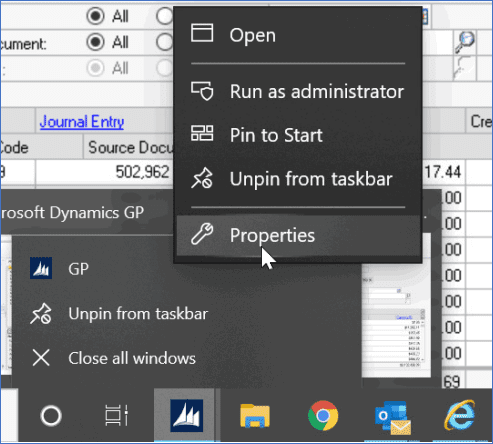
3. Within the GP Properties window, click on the Compatibility tab.
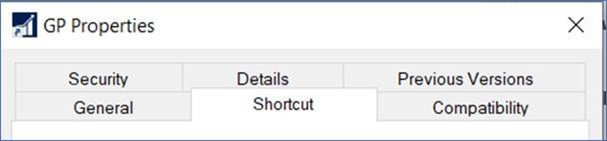
4. Within the Compatibility tab, click on the ‘Change high DPI settings’ button and then mark the checkbox to ‘Override high DPI scaling behavior’ within the additional GP Properties window that appears. In addition, select the ‘System’ option from the drop-down menu before clicking the ‘OK’ button on that same window.
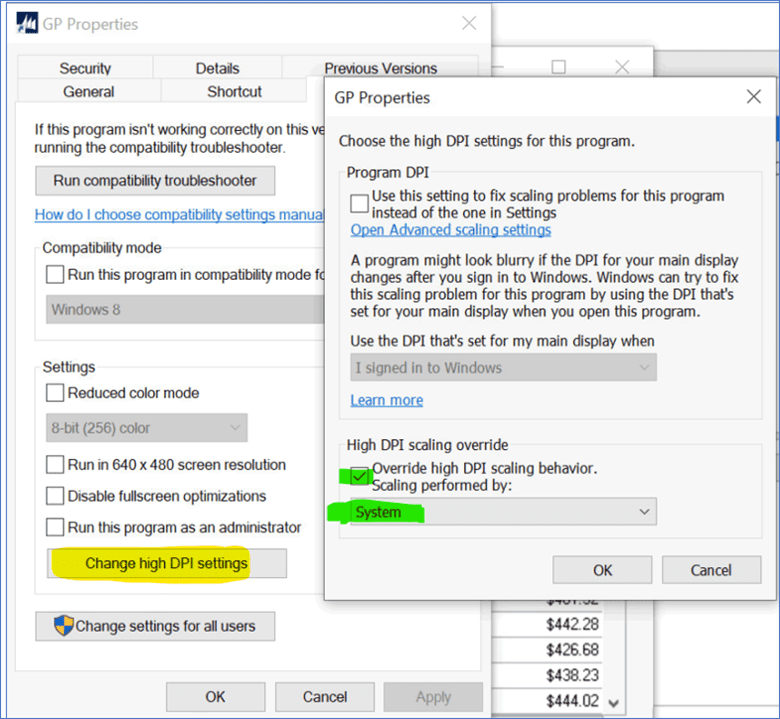
5. Within the main GP Properties window, click the ‘Apply’ button.

6. Click the ‘OK’ button to close the main GP Properties window.

7. And finally, launch Dynamics GP and log in to verify that the transaction/ inquiry windows are displaying as expected.

For more information on how to optimize your operations with Dynamics GP, please visit our BCS website or contact the BCS Team at sales@BondConsultingServices.com or (562) 988-3451!


Other articles

What Copilot “Cowork” Means for Business Users

Zoltan Orban

|

March 26, 2026
Microsoft recently introduced Copilot Cowork, and I wanted to take a closer look at what it represents in practical terms, especially for business users working across Microsoft 365 and related…

Why CRM Data Quality Matters More Than Data Volume

Marisa Mini

|

March 24, 2026
A database of 100,000 messy, outdated records is far less valuable than 5,000 that are clean and accurate. Companies often obsess over data volume. But when more data is prioritized over…

From Reactive to Predictive: AI in Business Central Distribution

Zoltan Orban

|

March 19, 2026
Most distribution teams don’t lack reporting. If anything, they often have too much of it. Dashboards, planning worksheets, inventory reports, and KPIs are readily available inside Dynamics 365 Business Central. Yet…

AI Agents in Business Central: How the Payables Agent Works

Jennifer Ryan

|

March 17, 2026
If you're curious how AI agents in Microsoft Dynamics 365 Business Central actually work, we're hosting a live walkthrough of the Payables Agent on March 26. See live how the agent…

Migrating 1.3 Million CRM Records in Dynamics 365: Why We Used a Custom Console App

Marisa Mini

|

March 5, 2026
A government client needed to restructure 1.3 million contact records in Microsoft Dynamics 365 CRM. At that scale, traditional UI tools and flows can throttle, fail silently, or leave a…

AI Agents in Manufacturing ERP: D365 Business Central Guide

Seetharaman Andiappan Rajaram

|

March 4, 2026
AI agents are now live inside Microsoft Dynamics 365 Business Central. For manufacturers evaluating AI in ERP systems, the practical question isn’t what an agent is it’s how AI agents…



