Microsoft Copilot $21 now $18/user/month + 1 month free

May 21, 2016

One Sale; Two Invoices in Dynamics GP

Recently, a customer of ours asked how they can invoice two customers that were splitting the cost for one piece of equipment. Since selling ½ of this product/ equipment was out of the question, we had to think of another approach. After doing a little bit of brainstorming, we came up with the following:

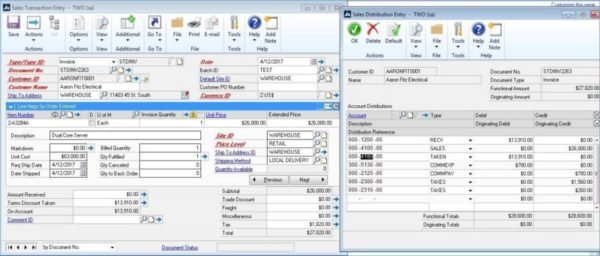
1. Invoice the entity that will be holding title to the equipment for the full amount
2. Back out the balance to be paid by the second entity through the Terms Discount Taken field
sales-trans-entry-GR

3. Create a new invoice for the second entity, but use a Non-Inventory item (this item happens to have a period at the end)
sales-trans-entry-2-GR

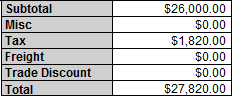
In concept, this should work as both customers would be receiving invoices for their respective balances due. The only issue we can foresee is that the formatting for the standard Dynamics GP invoice comes with the summarized amounts for the sale and not the amount due. This may require some modifications to be made within Report Writer to show the correct On Account balance for the first customer invoiced.
total-GR

Please check back on our blog series where we walk you through this process.

George Rios Microsoft Dynamics GP Consultant George Rios is a Microsoft Dynamics® GP Certified Professional and senior consultant at Bond Consulting Services. He has over 13 years of work experience with accounting and accounting systems.


Other articles

Migrating 1.3 Million CRM Records in Dynamics 365: Why We Used a Custom Console App

Marisa Mini

|

March 5, 2026
A government client needed to restructure 1.3 million contact records in Microsoft Dynamics 365 CRM. At that scale, traditional UI tools and flows can throttle, fail silently, or leave a…

AI Agents in Manufacturing ERP: D365 Business Central Guide

Seetharaman Andiappan Rajaram

|

March 4, 2026
AI agents are now live inside Microsoft Dynamics 365 Business Central. For manufacturers evaluating AI in ERP systems, the practical question isn’t what an agent is it’s how AI agents…

How to Use D365 Business Central Analysis Mode

Carlos Lozano

|

March 3, 2026
Transforming Data into Decisions for Modern Businesses Organizations using Microsoft Dynamics 365 Business Central generate significant volumes of financial and operational data. However, collecting data is only the first step. The…

BCS Partners with RUX Software to Deliver Equipment Rental and Field Service on Business Central

Jackie Gant

|

February 26, 2026
Bond Consulting Services (BCS) has partnered with RUX Software to deliver equipment rental and asset management capabilities for small and mid-sized businesses running on or moving to Microsoft Dynamics 365…

What AI Agents in Dynamics 365 Actually Do (A Plain-English Guide)

Jennifer Ryan

|

February 19, 2026
From Assistance to ActionIf you've been using Microsoft 365 Copilot, you've probably noticed something shift. Email gets drafted faster. Meeting notes appear without you scrambling. Spreadsheet analysis that used to…

D365 Business Central: Realistic AI Agent Scenarios for Operations Teams

Zoltan Orban

|

February 18, 2026
A Practical Look at Where AI Actually Helps in BC TodayThere’s a lot of talk about AI and ERP becoming fully automated. In reality, most teams aren’t trying to replace…



