AI vs Automation for Manufacturers | June 16

May 26, 2020

Troubleshooting Dynamics GP Window Scaling Issues on High Resolution Displays

Article by: George Rios – Senior Microsoft Dynamics GP Consultant

If you are having issues with your Dynamics GP windows appearing too small or too large on one or more monitors, one quick fix to try would be the following:

Closeout of Dynamics GP.

Click on the Dynamics GP icon (from the desktop or taskbar) and select Properties.
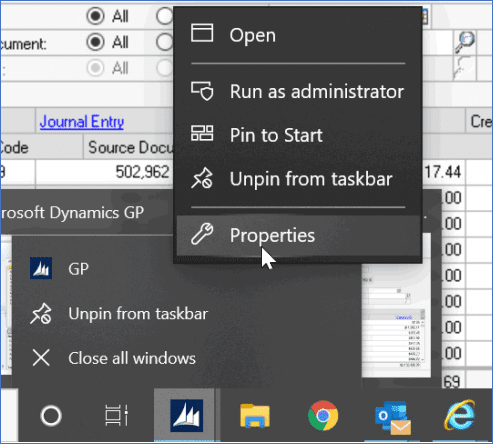
Within the GP Properties window, click on the Compatibility tab.

Within the Compatibility tab, click on the ‘Change high DPI settings’ button and then mark the checkbox to ‘Override high DPI scaling behavior’ within the additional GP Properties window that appears. In addition, select the ‘System’ option from the drop-down menu before clicking the ‘OK’ button on that same window.

Within the main GP Properties window, click the ‘Apply’ button.

Click the ‘OK’ button to close the main GP Properties window.

And finally, launch Microsoft Dynamics GP and log in to verify that the transaction/ inquiry windows are displaying as expected.

Other articles

Microsoft’s New Expense Agent Simplifies Business Central Expense Reports

Clayton Jones

|

May 28, 2026
Most expense management improvements over the years have been incremental. Better OCR. Faster receipt capture. A mobile app instead of a desktop form. The underlying workflow stayed the same: employee…

When Does Dynamics 365 Business Central Need Power BI?

Clayton Jones

|

May 20, 2026
Thanks to Dynamics 365 Business Central, your processes have been streamlined, your finances smartly managed, and your sales cycle enhanced. Your business has been running so smoothly that you’ve finally…

From Power Automate to Microsoft Copilot: Where Workflow Automation Ends and AI Assistance Begins

Zoltan Orban

|

May 19, 2026
Webinar: AI or Automation? How to Know What Your Manufacturing Business Actually NeedsJune 16 @ 11:00 AM PT/2:00 PM ETRegister Now!Most operational problems are not as simple as “add AI.”…

Project Online Retirement: What Businesses Need to Do Before September 2026

Daniel Dix

|

May 7, 2026
For years, Project Online, Microsoft’s cloud-hosted project and portfolio management (PPM) solution, built on SharePoint Online has played a central role in enterprise environments, supporting everything from detailed scheduling to…

Microsoft Dynamics 365 Business Central Implementation Packages

Clayton Jones

|

April 29, 2026
If you’re like 99% of our clients, you’re trying to rein in the soaring costs of technology. It’s a delicate balancing act. On the one hand, you understand that you…

Doing More With the Team You Have: What BCS is Changing with AI

Jackie Gant

|

April 29, 2026
AI is everywhere right now, but what feels different is the pace. For the first time in a long time, small and mid-sized businesses are adopting new technology just as quickly…