AI vs Automation for Manufacturers | June 16

January 21, 2022

How can I track Jobs or Projects in Business Central

The Jobs Module within Business Central helps you manage various projects. You can track employee work hours through the Time Sheets function, monitor budgets and actual usage, view inventory and resources assigned to the jobs, invoice a customer, or make purchases linked to the job.

Let’s review an example of the project:

Within each job you can assign prices to Resources, Items, or G/L Accounts in order to track costs and budgets.

The period and progress of each job is also displayed here to allow a thorough view of operations. With the next layer as a Job Task, you can post and review the completion of the job.
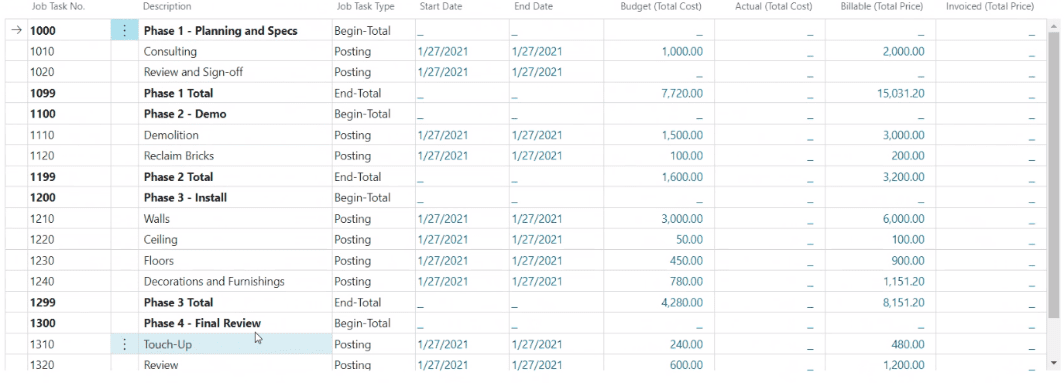
Having layers in a project allows you to divide the job into smaller tasks, and therefore use more specific details in budgeting, quotes, and registration. The visibility to each step allows you to see if you are meeting defined targets or if your budget expectations are met.

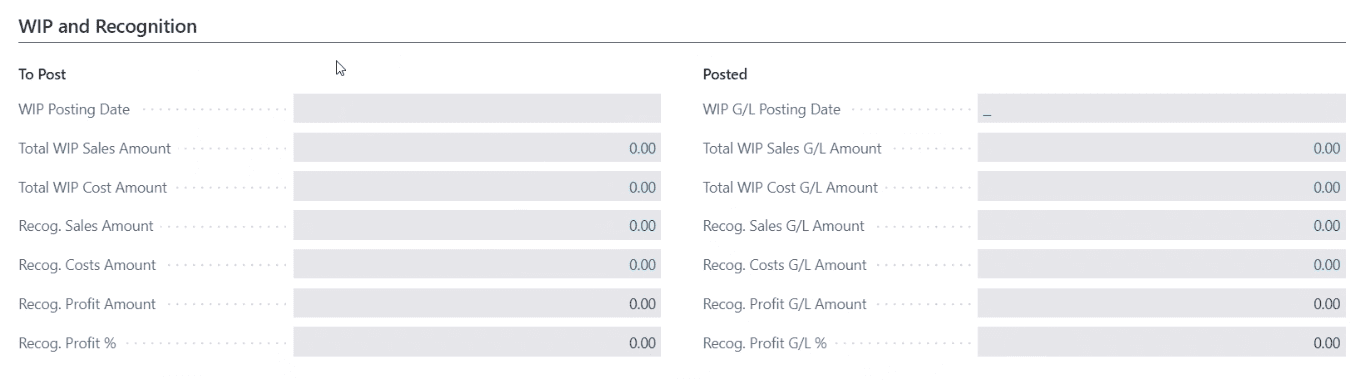
You can change the status of the job as it progresses and monitor Job Progress and Performance by making Work in Progress (WIP) calculations.

You can use Jobs module even if your business model is not around jobs. It can be used for various projects within the organization, whether it’s product development or even marketing efforts.

For additional questions about the Jobs module please reach out at support@lime-falcon-860444.hostingersite.com

Other articles

Microsoft’s New Expense Agent Simplifies Business Central Expense Reports

Clayton Jones

|

May 28, 2026
Most expense management improvements over the years have been incremental. Better OCR. Faster receipt capture. A mobile app instead of a desktop form. The underlying workflow stayed the same: employee…

When Does Dynamics 365 Business Central Need Power BI?

Clayton Jones

|

May 20, 2026
Thanks to Dynamics 365 Business Central, your processes have been streamlined, your finances smartly managed, and your sales cycle enhanced. Your business has been running so smoothly that you’ve finally…

From Power Automate to Microsoft Copilot: Where Workflow Automation Ends and AI Assistance Begins

Zoltan Orban

|

May 19, 2026
Webinar: AI or Automation? How to Know What Your Manufacturing Business Actually NeedsJune 16 @ 11:00 AM PT/2:00 PM ETRegister Now!Most operational problems are not as simple as “add AI.”…

Project Online Retirement: What Businesses Need to Do Before September 2026

Daniel Dix

|

May 7, 2026
For years, Project Online, Microsoft’s cloud-hosted project and portfolio management (PPM) solution, built on SharePoint Online has played a central role in enterprise environments, supporting everything from detailed scheduling to…

Microsoft Dynamics 365 Business Central Implementation Packages

Clayton Jones

|

April 29, 2026
If you’re like 99% of our clients, you’re trying to rein in the soaring costs of technology. It’s a delicate balancing act. On the one hand, you understand that you…

Doing More With the Team You Have: What BCS is Changing with AI

Jackie Gant

|

April 29, 2026
AI is everywhere right now, but what feels different is the pace. For the first time in a long time, small and mid-sized businesses are adopting new technology just as quickly…