After the “sa” login has been reset, there is important Dynamics GP information that needs to be validated to prevent the Dynamics GP SQL Server database backups or other SQL Server jobs from failing.
Within SQL Server Management Studio, you will want to expand the Management folder, then expand the Maintenance Plans folder; within the Maintenance Plans folder you will see the current plans listed. If you double-click the plan, you will see the plan properties similar to the one captured below. 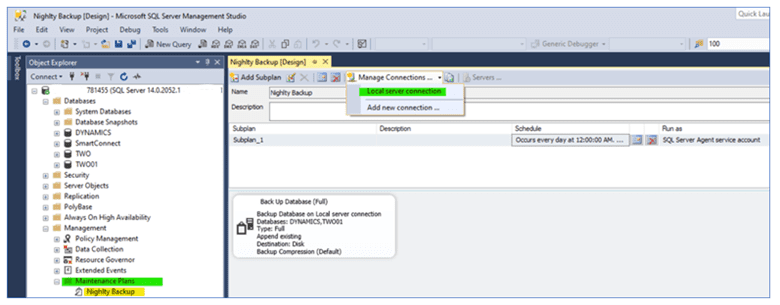
Click on the Manage Connections option and then select Local Server Connection to display the Connection Properties window.
If you are using the ‘sa’ login to establish the connection to the SQL Server, you will need to update the ‘sa’ password.
If you use the Windows NT Integrated Security option, you do not need to change anything.
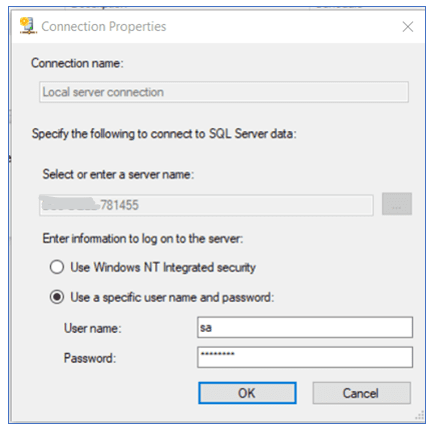 Click the OK button after updating the ‘sa’ password.
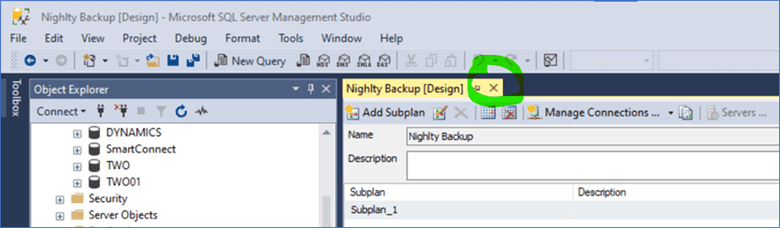
Close the Maintenance Plan by clicking the X next to the plan name (circled below) and save the changes that have been applied.
 This process will need to be repeated for any other SQL Server jobs that are listed within the Maintenance Plans folder.
For any clarification on this process, or questions about Dynamics GP in general, please reach out to us at Sales@BondConsultingServices.com or visit our YouTube channel for helpful recorded walkthroughs and product tutorials. Alternatively, you can click here to schedule a free consultation with one of our Dynamics expert consultants.