While the core functionality of Primo Payday within Dynamics 365 Business Central lies in streamlining payroll processing, its capabilities extend significantly beyond traditional salary and tax calculations. This add-on offers a robust suite of Human Resources features that are often overlooked. The following information focuses on data contained within the Payroll Employee Card in Business Central, simply navigate to Related > HR Employee Information.
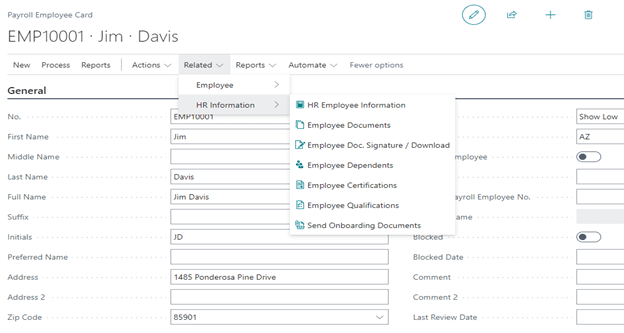
HR Employee Information
Former employers, review scores, and years of experience are examples of details that can be maintained within the “Employee HR Tracking” window. In this scenario, we can use a Boolean value to determine if Jim Davis was offered a relocation package when he first came onboard.

(“Boolean”, “Code”, “Text”, “Decimal”, “Time”, and “Date” are all selections for Value Type.)
Employee Dependents
Emergency contact and life insurance data represent some of the important items found within the “Payroll Employee Dependents” window.

Employee Certifications
Of course, the “Payroll Employee Certifications” window maintains crucial certification and compliance data.

This feature is not simply a repository. You can enable alerts for when certification expiration dates are approaching and even halt payroll runs in such circumstances.
To set up such alerts, navigate to the “Certification Code” drop-down list and choose  .
.

Send Onboarding Documents
Finding Send Onboarding Documents by navigating to Related > HR Information allows for e-mailing of such documents directly to an employee’s e-mail address.
Before trying to use this window, however, ensure that you search in Business Central for the “Onboarding Documents” administration window:

While in Onboarding Documents, click Upload File.

Next, navigate to click here to browse.

After selecting the file in the “Open” window and entering a “Code” and “Description”, Onboarding Documents will have its required fields updated. In the example below, the Policy Manual was uploaded.

The “State Filter” and “Payroll Division Code” fields are optional filters but can be helpful in e-mailing documents to your employees.

For more information about Business Central payroll capabilities or specifically the Primo Payday add-on, please reach out to us at Sales@BondConsultingServices.com or you can visit our YouTube channel to browse our product tutorials and recorded walkthroughs. Alternatively, you can click here to schedule a free consultation with one of our Dynamics 365 experts.