New Year, Smarter Work: Get 1 Month Free Copilot | Now $21/User.

June 1, 2021

Troubleshooting Dynamics GP Window Scaling Issues on High Resolution Displays

If you are having issues with your Dynamics GP windows appearing too small or too large on one or more monitors, one quick fix to try would be the following:

1. Close out of Dynamics GP.

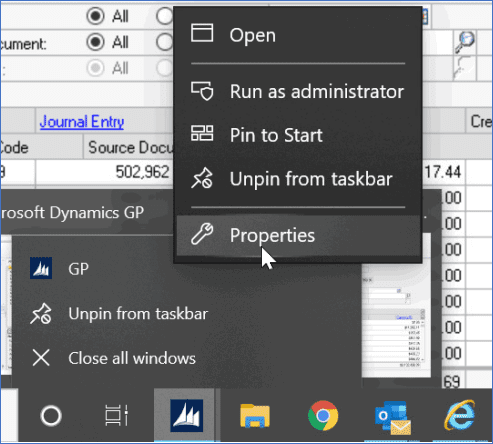
2. Click on the Dynamics GP icon (from the desktop or taskbar) and select Properties.
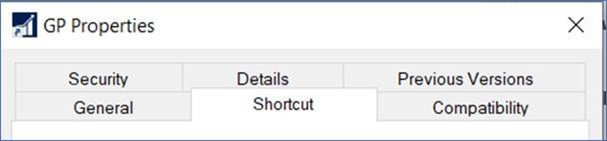
3. Within the GP Properties window, click on the Compatibility tab.
4. Within the Compatibility tab, click on the ‘Change high DPI settings’ button and then mark the checkbox to ‘Override high DPI scaling behavior’ within the additional GP Properties window that appears. In addition, select the ‘System’ option from the drop-down menu before clicking the ‘OK’ button on that same window.
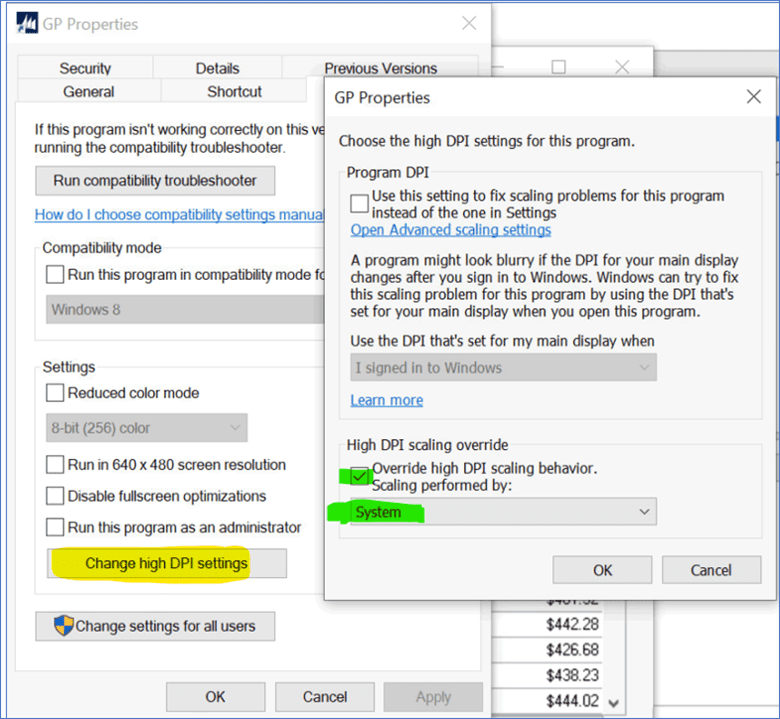
5. Within the main GP Properties window, click the ‘Apply’ button.

6. Click the ‘OK’ button to close the main GP Properties window.

7. And finally, launch Dynamics GP and log in to verify that the transaction/ inquiry windows are displaying as expected.

For more information on how to optimize your operations with Dynamics GP, please visit our BCS website or contact the BCS Team at sales@BondConsultingServices.com or (562) 988-3451!

Share On: 

Other articles

From Frustration to Future-Ready: What Growing Distributors Need to Know About Their Systems

Jennifer Ryan

|

January 8, 2026
I spent years on the other side of the table — inside distribution businesses, closing books at midnight, trying to reconcile inventory that never quite matched, and juggling spreadsheets that…

How Miron Violetglass Scaled 40% Without Adding Headcount

Jennifer Ryan

|

January 6, 2026
Every distributor reaches a point where growth exposes the cracks: too many spreadsheets, too much manual work, and not enough visibility. Miron Violetglass hit that moment and what happened next…

Why Distribution Hand-Offs Break (and How Connected Operations Fix Them)

Jennifer Ryan

|

December 18, 2025
Inside distribution companies, most problems don’t come from bad people or broken intentions. They come from gaps in the hand-offs between teams.As a Controller, I used to think our issues…

Unlocking Insights: Power BI Integration with Dynamics 365 Business Central

Joel Trinidad

|

December 16, 2025
As businesses increasingly rely on data to drive decisions, Microsoft continues to enhance the synergy between Dynamics 365 Business Central (BC) and Power BI. With the release of Business Central Version 26, users now…

The Spreadsheet Trap in Distribution: Why You Lose Control Without Realizing It

Jennifer Ryan

|

December 11, 2025
Let me start with a confession: I love a good spreadsheet. They’re flexible. Fast. Familiar. Elegant.But here’s the problem no one talks about: Spreadsheets eventually become the system. And that’s…

How to Connect Power Pages & D365 Customer Engagement for a Seamless Self-Service Experience

Marisa Mini

|

December 4, 2025
Power Pages for Customer Service, Field Service, and Sales PortalsCreating a seamless, modern customer experience starts with reducing the back-and-forth. If your customers (or vendors, partners, applicants, members, etc.) still…