See Microsoft 365 Copilot in action across Outlook, Teams, Excel + more.

May 21, 2016

One Sale; Two Invoices in Dynamics GP

Recently, a customer of ours asked how they can invoice two customers that were splitting the cost for one piece of equipment. Since selling ½ of this product/ equipment was out of the question, we had to think of another approach. After doing a little bit of brainstorming, we came up with the following:

1. Invoice the entity that will be holding title to the equipment for the full amount
2. Back out the balance to be paid by the second entity through the Terms Discount Taken field
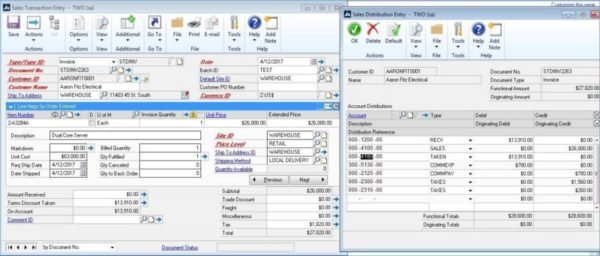
sales-trans-entry-GR

3. Create a new invoice for the second entity, but use a Non-Inventory item (this item happens to have a period at the end)
sales-trans-entry-2-GR

In concept, this should work as both customers would be receiving invoices for their respective balances due. The only issue we can foresee is that the formatting for the standard Dynamics GP invoice comes with the summarized amounts for the sale and not the amount due. This may require some modifications to be made within Report Writer to show the correct On Account balance for the first customer invoiced.
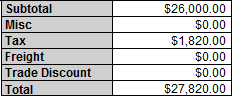
total-GR

Please check back on our blog series where we walk you through this process.

George Rios Microsoft Dynamics GP Consultant George Rios is a Microsoft Dynamics® GP Certified Professional and senior consultant at Bond Consulting Services. He has over 13 years of work experience with accounting and accounting systems.

Share On: 

Other articles

How to Connect Power Pages & D365 Customer Engagement for a Seamless Self-Service Experience

Marisa Mini

|

December 4, 2025
Power Pages for Customer Service, Field Service, and Sales PortalsCreating a seamless, modern customer experience starts with reducing the back-and-forth. If your customers (or vendors, partners, applicants, members, etc.) still…

How to Tell if Your Distribution Business Has Outgrown Its Systems

Jennifer Ryan

|

December 1, 2025
As a former Controller inside a fast-moving distribution business, I learned this lesson the hard way: You don’t realize your system is breaking until growth exposes every weakness.It doesn’t happen…

Why Microsoft Killed Social Posting (And Why SMBs Should Care)

Jackie Gant

|

November 25, 2025
When Microsoft quietly pulled the plug on social posting in Dynamics 365 Customer Insights late last year, few in the small to mid-sized business (SMB) space raised an eyebrow. After…

Design Smarter, Present Better: How Microsoft 365 Copilot in PowerPoint Transforms Productivity

Joel Trinidad

|

November 20, 2025
Part of our “Work Smarter with Copilot” series — exploring how Microsoft 365 Copilot transforms productivity across Outlook, Teams, PowerPoint, Excel, and more.The Presentation Problem We All Know Too Well The blinking cursor,…

How Microsoft 365 Copilot in Teams Helps You Work Smarter (and Recover Lost Time)

Joel Trinidad

|

November 18, 2025
Part of our “Work Smarter with Copilot” series — exploring how Microsoft 365 Copilot transforms productivity across Outlook, Teams, PowerPoint, Excel, and more.The Communication Overload Holding Teams Back We’ve all felt it—the…

Free vs Paid: How Microsoft 365 Copilot Unlocks Real Productivity ROI

TJ Sedarski

|

November 13, 2025
Part of our “Work Smarter with Copilot” series — exploring how Microsoft 365 Copilot transforms productivity across Outlook, Teams, PowerPoint, Excel, and more.Copilot Free Chat is a good place to start in…