Microsoft Copilot $21 now $18/user/month + 1 month free

June 7, 2021

Correcting Dimensions in Business Central

With the release of Business Central version 18, Microsoft has included a new tool to correct dimensions for general ledger entries. Before this release, if a dimension was assigned incorrectly in a transaction a user would need to reverse the entry and re-enter it. Users will now be able to avoid the need to reverse the entry and simply correct the dimension. The Dimension Correction Tool includes:

    • Ability to correct assigned dimensions on G/L Entries
    • Trace history of corrections to a G/L entry
    • Undo Corrections made
    • Immediate run or background job
    • Separate update of analysis Views and Cost Accounting

To make a correction, you will find the option within the General Ledger Entries window under Entry > Correct Dimensions.

In the Draft Dimension Correction page, you can specify the dimension code that you want to change and then select “Run” for the change to take effect.

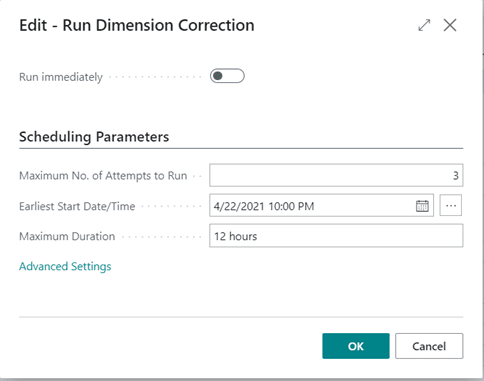
A page will come up allowing you to either schedule the job to make the change or immediately run the change.
Once the change is made, you will receive a confirmation that the process was successful.

Users will be able to review the history of changes made by selecting Entry > History of Dimension Corrections. If needed, the changes can also be undone within this page.

At this point, this tool will only affect the general ledger and it will not adjust the subledgers. There will be a discrepancy between ledgers when a change is made, but if you are looking for the financial reports to be correct, then this will allow users to save time in their day to day activities within Business Central.

To learn more about how Dynamics 365 Business Central can help your business, please contact sales@BondConsultingServices.com or schedule a free consultation on our website!


Other articles

What Copilot “Cowork” Means for Business Users

Zoltan Orban

|

March 26, 2026
Microsoft recently introduced Copilot Cowork, and I wanted to take a closer look at what it represents in practical terms, especially for business users working across Microsoft 365 and related…

Why CRM Data Quality Matters More Than Data Volume

Marisa Mini

|

March 24, 2026
A database of 100,000 messy, outdated records is far less valuable than 5,000 that are clean and accurate. Companies often obsess over data volume. But when more data is prioritized over…

From Reactive to Predictive: AI in Business Central Distribution

Zoltan Orban

|

March 19, 2026
Most distribution teams don’t lack reporting. If anything, they often have too much of it. Dashboards, planning worksheets, inventory reports, and KPIs are readily available inside Dynamics 365 Business Central. Yet…

AI Agents in Business Central: How the Payables Agent Works

Jennifer Ryan

|

March 17, 2026
If you're curious how AI agents in Microsoft Dynamics 365 Business Central actually work, we're hosting a live walkthrough of the Payables Agent on March 26. See live how the agent…

Migrating 1.3 Million CRM Records in Dynamics 365: Why We Used a Custom Console App

Marisa Mini

|

March 5, 2026
A government client needed to restructure 1.3 million contact records in Microsoft Dynamics 365 CRM. At that scale, traditional UI tools and flows can throttle, fail silently, or leave a…

AI Agents in Manufacturing ERP: D365 Business Central Guide

Seetharaman Andiappan Rajaram

|

March 4, 2026
AI agents are now live inside Microsoft Dynamics 365 Business Central. For manufacturers evaluating AI in ERP systems, the practical question isn’t what an agent is it’s how AI agents…



