

Microsoft Dynamics 365 Business Central Worksheets represent one of the many reasons why the ERP application is relatively easy to use.
Armed with these Worksheets, you can automatically and quickly create warehouse transactions and other business records. Worksheets are shortcuts helping you achieve your supply chain management goals.
Bin Creation Worksheet
True, the creation of bin locations one at a time isn’t difficult. And, at first glance, reviewing the simple “Bin Code” and “Description” fields makes the Bin Creation Worksheet appear useless.
But, if you dig deeper, you’ll discover how useful this Worksheet actually is.
The Bin Creation Worksheet creates not just multiple bins at once. This tool, also, creates multiple bins having multiple characteristics at once.
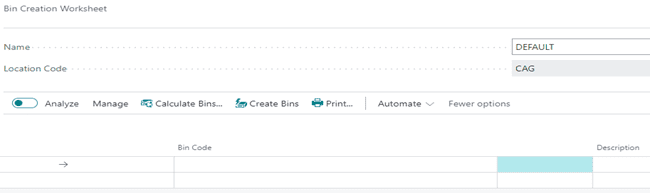 Use Business Central’s “Personalize” feature to add any of the following fields to the Worksheet:
- Bin Ranking,
- Bin Type Code,
- Block Movement,
- Cross-Dock Bin,
- Maximum Cubage,
- Maximum Weight,
- Special Equipment Code,
- Warehouse Class Code, and
- Zone Code.
Clicking the “Calculate Bins” button allows you to create a range of Racks, Sections, and Levels:

In the “From No.” and “To No.” fields, you must use the same letter. For example, place “A01” as the From No. and “A10” as the To No.
If you’d like to specify a character such as a dot to separate Rack, Section, and Level place the dot within Field Separator.
Select Check on Existing Bin, so that the Worksheet doesn’t try to create a bin where one already exists.
Bin Content Creation Worksheet
Marking a bin as Fixed or Default for a specific inventory item is the purpose of the Bin Content Creation Worksheet:
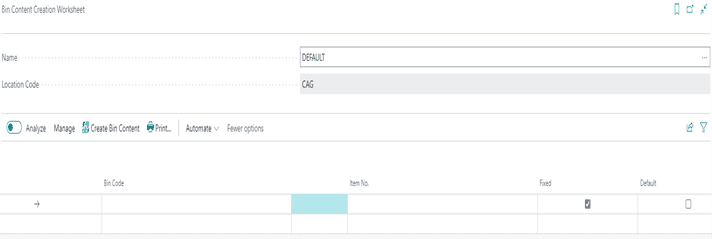
Use Business Central’s “Personalize” feature to add any of the following fields to the Worksheet:
- Bin Ranking,
- Bin Type Code,
- Block Movement,
- Cross-Dock Bin,
- Qty.,
- Qty.,
- Unit of Measure Code,
- Variant Code,
- Warehouse Class Code, and
- Zone Code.
Requisition Worksheet
The Requisition Worksheet conducts pegging and is, therefore, an important MRP tool. When running low on materials, the Worksheet generates Purchase Orders for the quantity necessary to meet the customer demand of Sales Orders:

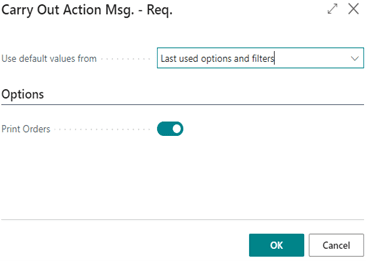
In addition to creating Purchase Orders in the background, the Worksheet will prompt you to print Purchase Orders:
Planning Worksheet
Business Central’s planning mechanism reviews all supply and demand data, nets the results, and creates suggestions for balancing the supply to meet the demand.
Planning ensures that demand for manufactured items found on Sales Orders is met, by advising you when Production Orders need to be generated.
The Worksheet can generate Assembly Orders, Purchase Orders, and Transfer Orders in addition to Production Orders.
So, this Worksheet processes pegging data and is an important component of both MRP and MPS.

Subcontracting Worksheet
Through the Subcontracting Worksheet, Business Central provides a handy way of generating and printing Purchase Orders when services need to be outsourced:

Put-away Worksheet
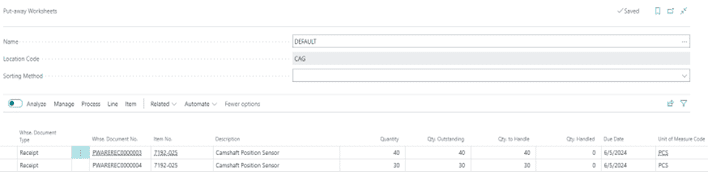
If your location requires both put-away and receive processing and you want to plan put-away instructions for more than one Warehouse Receipt, use the Put-away Worksheet.
Rather than having your warehouse personnel follow the instructions of a separate posted Warehouse Receipt, save time by processing multiple receipts within this one screen:
Picking Worksheet
Specialized instructions for picking inventory items for shipping products to customers are found within a warehouse order picking system called waving.
Time is money. Wave picking streamlines order fulfillment allowing the warehouse employee to quickly group items by a specific characteristic, such as shipping priority, zone, bin, or carrier.
For example, waving can be conducted through batch picking close to the time of carrier departure.
In another example, promotions may spike demand for a few items. These items can then be lumped within a wave to ensure picking efficiency.
Multiple orders are housed within small groups, or waves. The warehouse employee will, therefore, pick all orders within the wave in one pass using a consolidated picking list.
Using such a picking list the warehouse employee does not have to walk back and forth but, rather, accomplishes picking within one single trip. Warehouse productivity then increases and products are shipped on time.
Waving is accomplished by using the Pick Worksheet and making pick selections by line item:









