Sales tax works...until it doesn't. Join our May 5 webinar.

October 27, 2022

How-To Change the Format of the Invoice Email

Recently one of our clients had an issue sending out reports in a custom template that was different than the default report. An administrative user need only to follow these steps for the solution as well as viewing all of your custom report templates at a glance. Essentially, the admin user will be setting the desired report template as the default, so that when the email is created it would be in the correct format.

This method can be used for any type of report including invoices and quotes. If it is only a one-time send, then this process may be repeated to reselect the original template as the default and return to business as usual.

Here are the detailed steps to the solution:

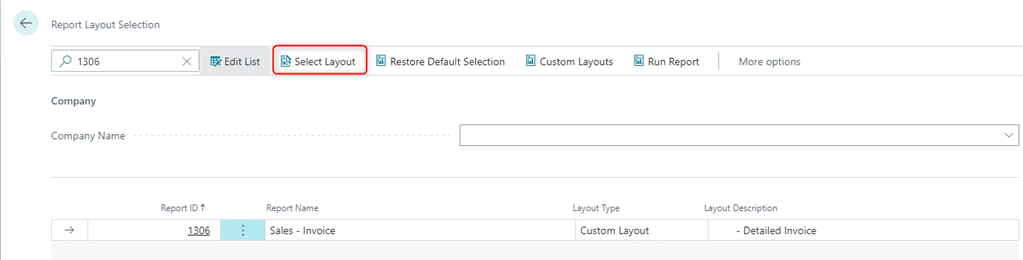
  1. Begin by navigating to the Report Layout Selection page. Click the Search icon and type in Report Layout Selection. Then, select the Report Layout Selection link.
  2. Within the search, type in 1306 (for a Sales Invoice modification)
  3. Click Select Layout
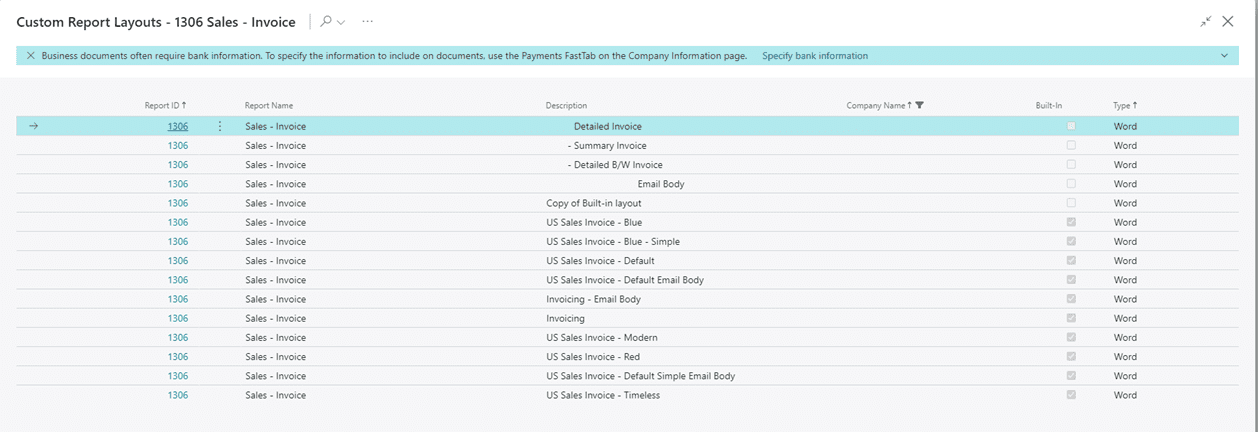
  4. Then, from the below list, select the Summary Invoice. Then click Ok.
    To change it back to the Detailed invoice, you may start from step 3 and change it back to the Detailed Invoice.


For more information on this process or questions about Microsoft Dynamics 365 Business Central capabilities, please reach out to us at Support@lime-falcon-860444.hostingersite.com or click here to schedule a free consultation with one of our experts.

Other articles

Microsoft Dynamics 365 Business Central Implementation Packages

Clayton Jones

|

April 29, 2026
If you’re like 99% of our clients, you’re trying to rein in the soaring costs of technology. It’s a delicate balancing act. On the one hand, you understand that you…

Doing More With the Team You Have: What BCS is Changing with AI

Jackie Gant

|

April 29, 2026
AI is everywhere right now, but what feels different is the pace. For the first time in a long time, small and mid-sized businesses are adopting new technology just as quickly…

Why AI Sometimes Feels Off (Even When You Have the Data)

Zoltan Orban

|

April 23, 2026
Webinar: Doing More With the Team You Have | What BCS is Changing About AIApril 28 @ 12:00 PM PT/3:00 PM ETRegister Now!Most small and mid-sized businesses aren't behind on…

What 200% ROI from Business Central Really Looks Like

Jackie Gant

|

April 13, 2026
Where ROI actually shows up from finance efficiency to operational visibility Forrester says Business Central delivers 200% ROI. But what does that actually look like in practice? A recent Total Economic…

Do You Need Avalara for Business Central? A Practical Guide

Clayton Jones

|

April 10, 2026
Webinar: Sales Tax Works…Until It Doesn’t: Tax Complexity at Scale for Product CompaniesMay 5 @ 10:00 AM PT/1:00 PM ETRegister Now!Most companies focused on making, distributing, or selling products manage…

What Is Work IQ? How Microsoft Copilot Moves from Data to Context

Zoltan Orban

|

April 9, 2026
Work IQ is one of those terms that can sound more complex than it really is. Most AI tools today work by pulling from available data. They can read records, summarize…