See Microsoft 365 Copilot in action across Outlook, Teams, Excel + more.

September 7, 2023

Performing Financial Health Checks in Business Central

When it comes to accessing your financial data, Business Central is one of the most powerful engines you can install to drive your business forward. Making sure everything is well maintained and operating at peak performance is key to continue delivering the best results for your business.

That’s where a monthly financial health check can add immense value. A health check is a simple way to see whether your GL is in balance with your Sub-ledger for AR, AP, Inventory and Payroll.

With ERP Connect’s Financial Dashboard, the Balance Check module is just the start. As a business owner, your team will have access to over 35 different KPIs focused around:

  • GL – Balance Checks, KPIs, and Financial Reports
  • AR – Aging charts, overdue customer summary, detailed customer trial balance (Image Below)
  • AP – Aging charts, overdue vendor summary, detailed vendor trial balance
  • Inventory – valuation insights, inventory warnings, and analysis statistics
  • Sales – Overviews by dimension, top customers, top items, profitability, and more
  • Cash – Cash positions, balance checks, historic cash trends, future forecasting
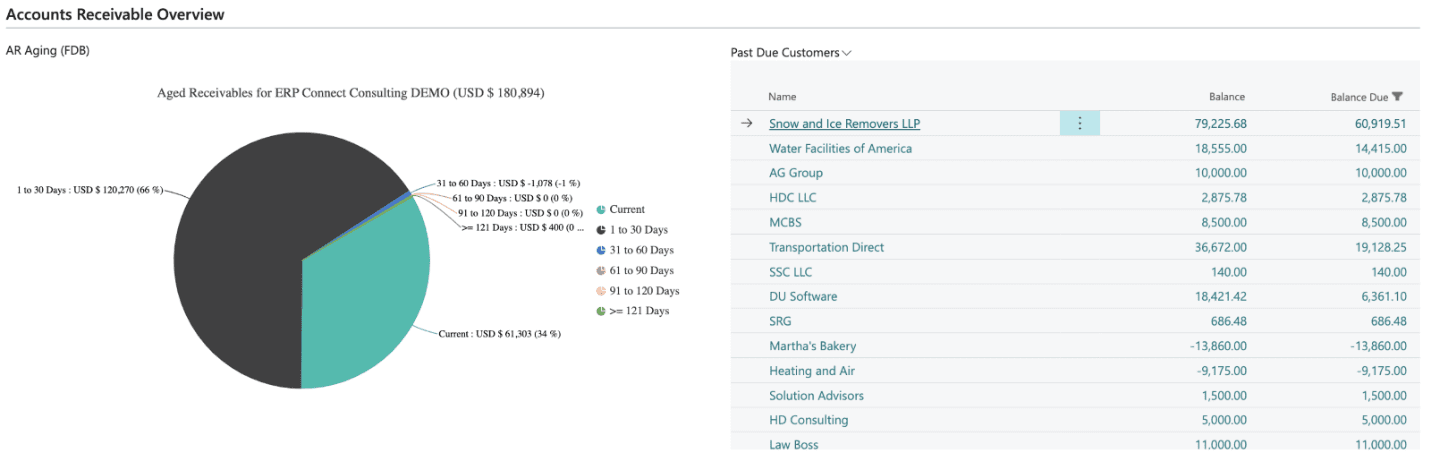
Every module within the Financial Dashboard is built natively into Business Central and meant to give your team a holistic view of your company at a glance. Now you will have the tools to diagnose any issues with your business and ensure it is operating at peak financial efficiency.

If you are interested in a 30 day free trial of ERP Connect’s Financial Dashboard, please reach out to us at Support@BondConsultingServices.com or you can click here to schedule a free consultation with one of our Dynamics experts.


Share On: 

Other articles

How to Connect Power Pages & D365 Customer Engagement for a Seamless Self-Service Experience

Marisa Mini

|

December 4, 2025
Power Pages for Customer Service, Field Service, and Sales PortalsCreating a seamless, modern customer experience starts with reducing the back-and-forth. If your customers (or vendors, partners, applicants, members, etc.) still…

How to Tell if Your Distribution Business Has Outgrown Its Systems

Jennifer Ryan

|

December 1, 2025
As a former Controller inside a fast-moving distribution business, I learned this lesson the hard way: You don’t realize your system is breaking until growth exposes every weakness.It doesn’t happen…

Why Microsoft Killed Social Posting (And Why SMBs Should Care)

Jackie Gant

|

November 25, 2025
When Microsoft quietly pulled the plug on social posting in Dynamics 365 Customer Insights late last year, few in the small to mid-sized business (SMB) space raised an eyebrow. After…

Design Smarter, Present Better: How Microsoft 365 Copilot in PowerPoint Transforms Productivity

Joel Trinidad

|

November 20, 2025
Part of our “Work Smarter with Copilot” series — exploring how Microsoft 365 Copilot transforms productivity across Outlook, Teams, PowerPoint, Excel, and more.The Presentation Problem We All Know Too Well The blinking cursor,…

How Microsoft 365 Copilot in Teams Helps You Work Smarter (and Recover Lost Time)

Joel Trinidad

|

November 18, 2025
Part of our “Work Smarter with Copilot” series — exploring how Microsoft 365 Copilot transforms productivity across Outlook, Teams, PowerPoint, Excel, and more.The Communication Overload Holding Teams Back We’ve all felt it—the…

Free vs Paid: How Microsoft 365 Copilot Unlocks Real Productivity ROI

TJ Sedarski

|

November 13, 2025
Part of our “Work Smarter with Copilot” series — exploring how Microsoft 365 Copilot transforms productivity across Outlook, Teams, PowerPoint, Excel, and more.Copilot Free Chat is a good place to start in…