See Microsoft 365 Copilot in action across Outlook, Teams, Excel + more.

October 27, 2022

How-To Change the Format of the Invoice Email

Recently one of our clients had an issue sending out reports in a custom template that was different than the default report. An administrative user need only to follow these steps for the solution as well as viewing all of your custom report templates at a glance. Essentially, the admin user will be setting the desired report template as the default, so that when the email is created it would be in the correct format.

This method can be used for any type of report including invoices and quotes. If it is only a one-time send, then this process may be repeated to reselect the original template as the default and return to business as usual.

Here are the detailed steps to the solution:

  1. Begin by navigating to the Report Layout Selection page. Click the Search icon and type in Report Layout Selection. Then, select the Report Layout Selection link.

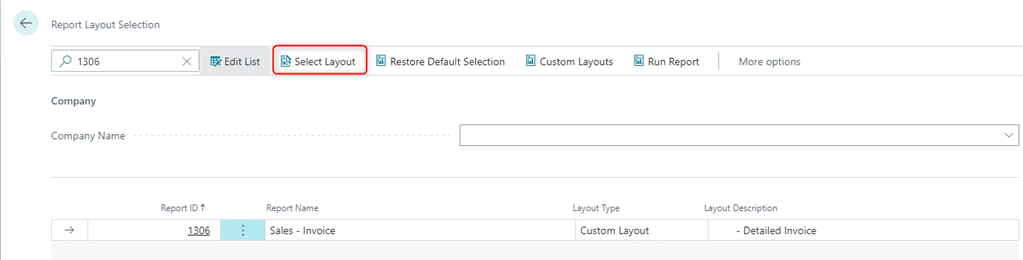
  2. Within the search, type in 1306 (for a Sales Invoice modification)

  3. Click Select Layout
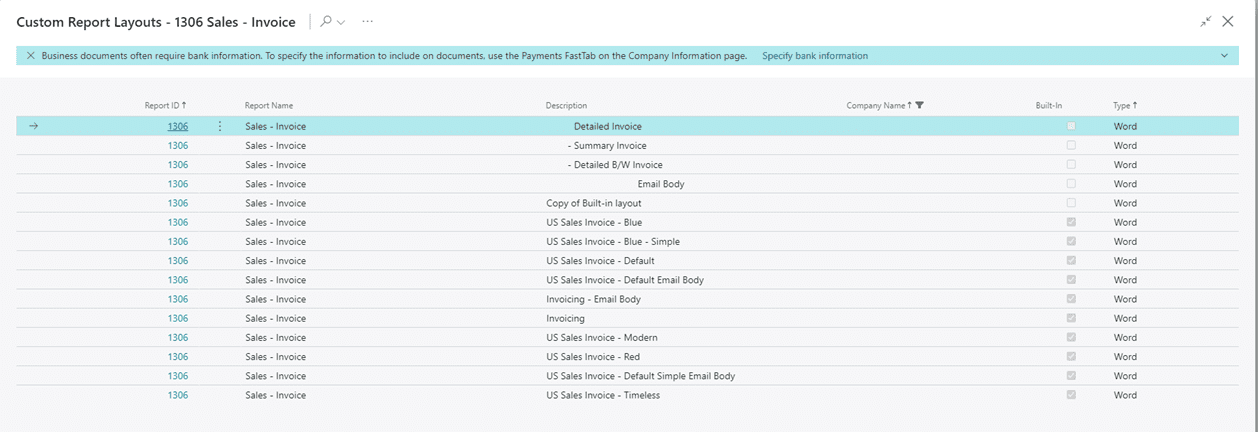
  4. Then, from the below list, select the Summary Invoice. Then click Ok.
    To change it back to the Detailed invoice, you may start from step 3 and change it back to the Detailed Invoice.
For more information on this process or questions about Microsoft Dynamics 365 Business Central capabilities, please reach out to us at Support@lime-falcon-860444.hostingersite.com or click here to schedule a free consultation with one of our experts.


Share On: 

Other articles

How to Connect Power Pages & D365 Customer Engagement for a Seamless Self-Service Experience

Marisa Mini

|

December 4, 2025
Power Pages for Customer Service, Field Service, and Sales PortalsCreating a seamless, modern customer experience starts with reducing the back-and-forth. If your customers (or vendors, partners, applicants, members, etc.) still…

How to Tell if Your Distribution Business Has Outgrown Its Systems

Jennifer Ryan

|

December 1, 2025
As a former Controller inside a fast-moving distribution business, I learned this lesson the hard way: You don’t realize your system is breaking until growth exposes every weakness.It doesn’t happen…

Why Microsoft Killed Social Posting (And Why SMBs Should Care)

Jackie Gant

|

November 25, 2025
When Microsoft quietly pulled the plug on social posting in Dynamics 365 Customer Insights late last year, few in the small to mid-sized business (SMB) space raised an eyebrow. After…

Design Smarter, Present Better: How Microsoft 365 Copilot in PowerPoint Transforms Productivity

Joel Trinidad

|

November 20, 2025
Part of our “Work Smarter with Copilot” series — exploring how Microsoft 365 Copilot transforms productivity across Outlook, Teams, PowerPoint, Excel, and more.The Presentation Problem We All Know Too Well The blinking cursor,…

How Microsoft 365 Copilot in Teams Helps You Work Smarter (and Recover Lost Time)

Joel Trinidad

|

November 18, 2025
Part of our “Work Smarter with Copilot” series — exploring how Microsoft 365 Copilot transforms productivity across Outlook, Teams, PowerPoint, Excel, and more.The Communication Overload Holding Teams Back We’ve all felt it—the…

Free vs Paid: How Microsoft 365 Copilot Unlocks Real Productivity ROI

TJ Sedarski

|

November 13, 2025
Part of our “Work Smarter with Copilot” series — exploring how Microsoft 365 Copilot transforms productivity across Outlook, Teams, PowerPoint, Excel, and more.Copilot Free Chat is a good place to start in…