Dynamics 365 Business Central allows users to quickly copy and paste data from Microsoft Excel directly into the General Journal, saving time and reducing manual entry errors.
This article outlines the correct process and common pitfalls to avoid.
Important Setup Notes
Before copying data from Excel:
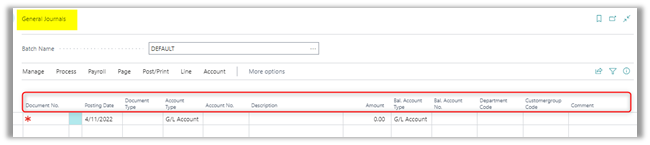
- Create an Excel worksheet with the same columns as configured on the General Journal.
- The General Journal can be personalized to match required fields.
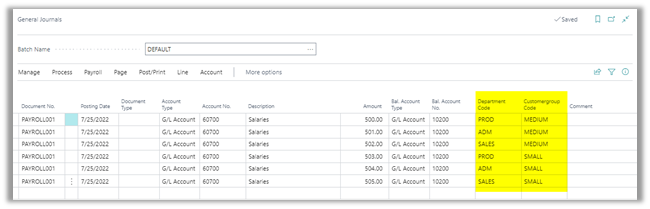
- Dimension Codes should be placed after the last Account No./Bal. Account No. fields. If an Account No. or Bal. Account No. field is populated after the dimension codes, the dimension codes will be blank.

Copying Data from Excel into Business Central
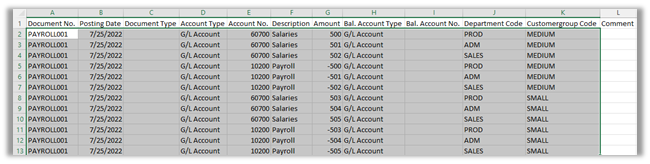
- In Excel, select the data to be copied to Business Central and right click to copy ( or use CTRL + C).

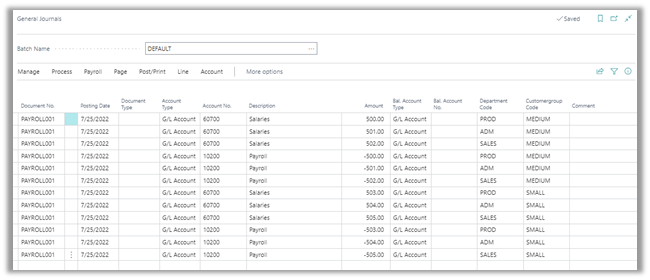
- Select the left-most cell on an empty line on the Business Central General Journal and right click to Paste (or use CTRL + V).

- Some or all rows can be deleted and re-imported.
- The following transaction is the same as above except that the offsetting account 10200 is entered to Bal. Account No. where Bal. Account No., above, is blank.

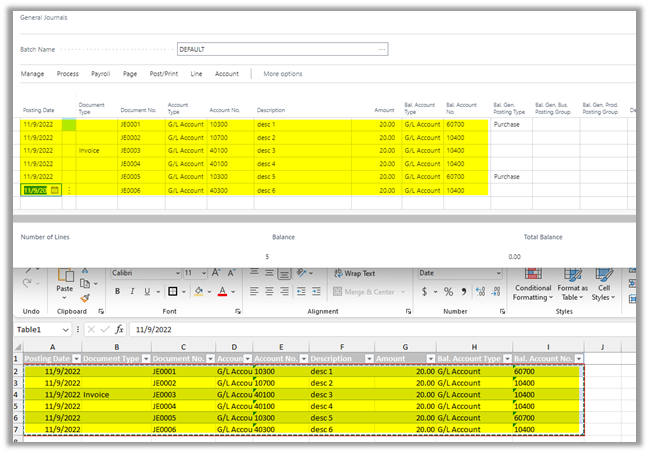
Following is another example of the Excel template and the related pasted data in Business Central. Data to the right of the copied columns has defaulted based on Business Central configurations.
Where This Fits in Business Central Projects
Journal workflows, dimension handling, and data entry processes are often standardized during a Business Central implementation to improve efficiency and prevent posting errors across finance teams.
Need Help with Journals or Data Imports?
If you have questions about journals, Excel integrations, or financial workflows in Business Central, our consultants are happy to help.