Microsoft Copilot $21 now $18/user/month + 1 month free

March 3, 2026

Customize Edit in Excel in Business Central

When working with Edit in Excel in Microsoft Dynamics 365 Business Central, it’s important to understand that this feature is more than a simple export tool. It creates a direct connection between Excel and your Business Central data, allowing updates made in Excel to be published back into the system. Because of this, any changes made and then published will modify live data, so it is essential to proceed with care. If you need to view the most up-to-date information without making changes, the Refresh option can be used to pull in the latest data safely.

Beyond basic use, Edit in Excel also supports additional functionality that enables users to tailor the experience to better fit their needs. Rather than repeatedly exporting, modifying, and publishing data, users can customize the fields and configuration of the Excel file for ongoing use. This approach helps streamline recurring tasks and promotes consistency in how data is managed outside of Business Central.

The following section outlines how to customize the fields and structure of an Edit in Excel file, allowing it to be reused efficiently while maintaining alignment with Business Central data.

1. Export Edit in Excel from Business Central
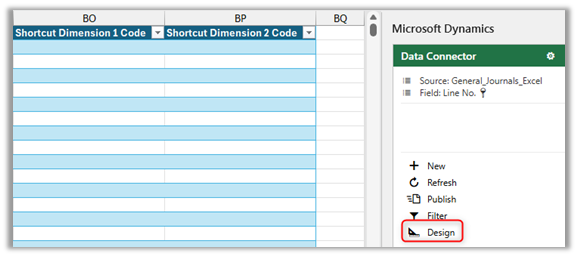
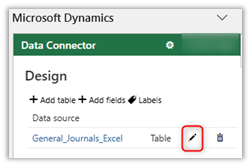
2. In Data Connector, Select Edit (Pencil)
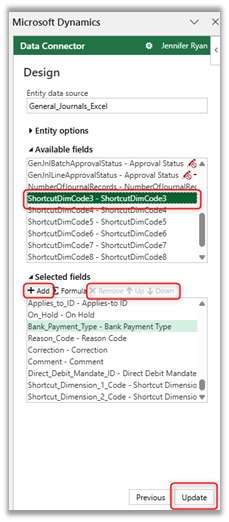
3. To Add Columns, select a column from Available Fields and +Add to Selected Fields. Or Remove Columns or move them Up or Down. Then, Update.
4. Add or Remove filters
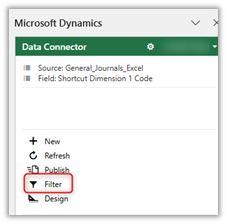
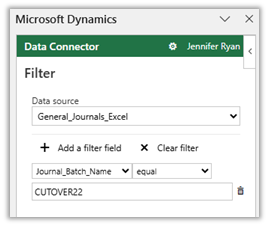
5. Excel → File → Save File

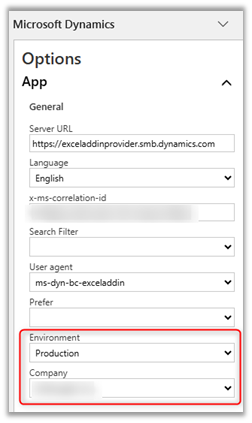
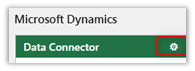
6. To Modify Company
Have Additional Questions? Contact Us Today

Other articles

Where Microsoft Copilot Fits into the Workday

Zoltan Orban

|

March 31, 2026
There is a lot of marketing around Copilot, but in practice, its value often shows up in small, everyday tasks. It is not a replacement for expertise, but it can…

What Copilot “Cowork” Means for Business Users

Zoltan Orban

|

March 26, 2026
Microsoft recently introduced Copilot Cowork, and I wanted to take a closer look at what it represents in practical terms, especially for business users working across Microsoft 365 and related…

Why CRM Data Quality Matters More Than Data Volume

Marisa Mini

|

March 24, 2026
A database of 100,000 messy, outdated records is far less valuable than 5,000 that are clean and accurate. Companies often obsess over data volume. But when more data is prioritized over…

From Reactive to Predictive: AI in Business Central Distribution

Zoltan Orban

|

March 19, 2026
Most distribution teams don’t lack reporting. If anything, they often have too much of it. Dashboards, planning worksheets, inventory reports, and KPIs are readily available inside Dynamics 365 Business Central. Yet…

AI Agents in Business Central: How the Payables Agent Works

Jennifer Ryan

|

March 17, 2026
Scroll to the bottom of the blog for a recorded demo of the Payables Agent in D365 Business Central. Accounts payable teams often spend hours each week downloading invoices, entering data,…

Migrating 1.3 Million CRM Records in Dynamics 365: Why We Used a Custom Console App

Marisa Mini

|

March 5, 2026
A government client needed to restructure 1.3 million contact records in Microsoft Dynamics 365 CRM. At that scale, traditional UI tools and flows can throttle, fail silently, or leave a…